After rebuilding Docker networking from Linux namespaces and veth pairs, I wanted to move one level closer to the kind of network devices those containers might depend on. I had a better picture of the host underneath Docker. The next question was how to describe, start and troubleshoot a small network without assembling every namespace by hand.
Containerlab fit that step. I ran it in an Ubuntu VM through OrbStack and used Nokia SR Linux containers as the network nodes. The topology lived in YAML, but the useful part was not getting the YAML to parse. It was learning to separate a running node from a working link.
Two nodes and one cable
My first topology was deliberately small:
name: first-lab

topology:
  nodes:
    srl1:
      kind: srl
      image: ghcr.io/nokia/srlinux:24.10.1
    srl2:
      kind: srl
      image: ghcr.io/nokia/srlinux:24.10.1

  links:
    - endpoints: ["srl1:e1-1", "srl2:e1-1"]
The image was pinned rather than left on latest, and the link joined the first Ethernet interface on each node. With one matching *.clab.yml file in the directory, Containerlab could find it without an explicit path:
clab deploy
clab inspect
I used docker exec to enter the SR Linux CLI and inspect the node locally:
docker exec -it clab-first-lab-srl1 sr_clishow version
show interface brief
show system applicationdocker exec works here because these are containers on my own lab host. It is a troubleshooting shortcut, not how I would manage a remote production switch. SSH is the familiar interactive route; model-driven interfaces such as NETCONF and gNMI give automation tools structured access without scraping terminal output.
The interface output also showed what Containerlab had done for the SR Linux nodes. ethernet-1/1 was administratively enabled and operationally up because it appeared in the topology's links section and had a peer at the other end.
Adding a middle node
I then built a three-node line:
srl1 ---- srl2 ---- srl3The middle node needed a separate interface for each neighbour:
links:
  - endpoints: ["srl1:e1-1", "srl2:e1-1"]
  - endpoints: ["srl2:e1-2", "srl3:e1-1"]
After deployment, srl2 showed both ethernet-1/1 and ethernet-1/2 enabled and up. Writing the endpoint pairs made the relationship concrete: Containerlab was creating two distinct data-plane links, not attaching all three nodes to an implied shared network.
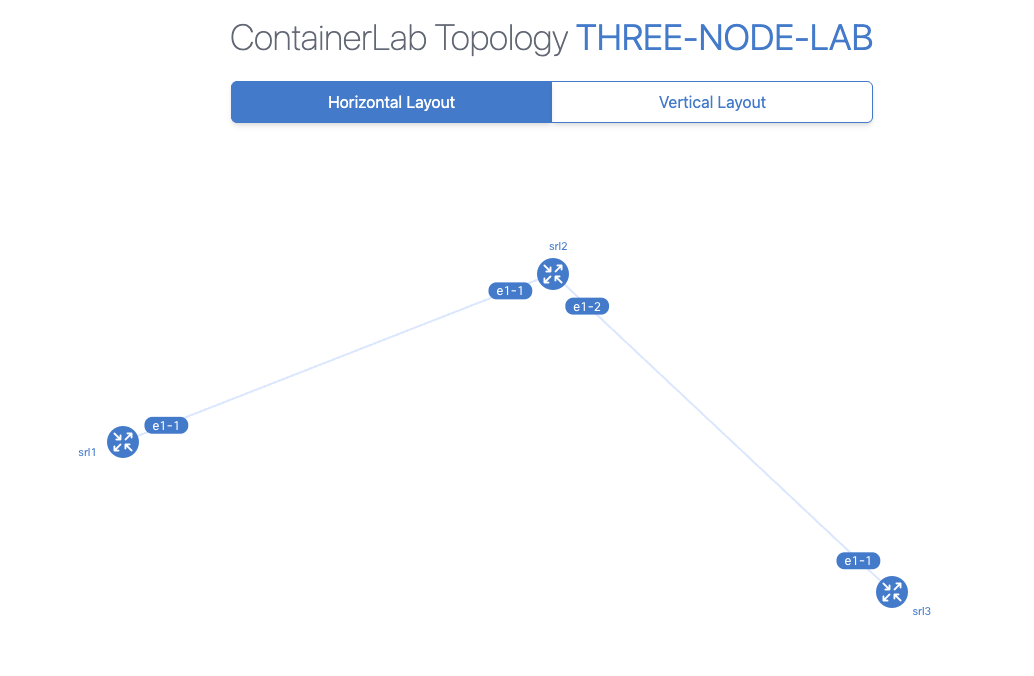
The exercise's graph command included a PNG output option, but my installed Containerlab version served the graph through its web interface on port 50080 instead. I opened the rendered graph through the OrbStack VM hostname and captured the image from there. I also exported clab inspect as JSON, giving me a machine-readable record of the deployed lab rather than another terminal table.
That inspection JSON describes Containerlab's view of the lab. It is different from an SR Linux startup configuration. SR Linux accepts a full config.json or partial CLI commands as startup configuration, while containerlab save can persist changes made to a running node.
One router, one Linux host
The mixed topology replaced the second SR Linux node with Alpine:
name: mixed-lab

topology:
  nodes:
    router:
      kind: srl
      image: ghcr.io/nokia/srlinux:24.10.1
    host1:
      kind: linux
      image: alpine:3.20

  links:
    - endpoints: ["router:e1-1", "host1:eth1"]
Inside host1, ip addr show eth1 reported UP,LOWER_UP. That proved the interface existed and had a working Layer 2 peer. It did not prove IPv4 connectivity: the interface had no inet address. To test that, I would first need to address both ends and then ping the router's interface.
That distinction mattered in the fault exercises. An interface can exist without an address. A node can run without a data-plane link. Each check answers a narrower question than I used to give it credit for.
Stopped is not deleted
For the first break/fix exercise, I stopped one node from the original two-node lab:
docker stop clab-first-lab-srl2docker exec failed because the container was not running, and clab inspect showed srl2 as exited. Starting the same container was enough:
docker start clab-first-lab-srl2I did not need to redeploy the topology. The node had been stopped, not removed, so starting it resumed the existing container and lab state. The links section was not being executed again by docker start.
This was a useful lifecycle boundary. If the node had been removed, Containerlab would need to recreate it. A stopped node was still the same object waiting to run again.
Running is not connected
The final exercise began with two healthy-looking containers and no link:
name: broken-lab

topology:
  nodes:
    srl1:
      kind: srl
      image: ghcr.io/nokia/srlinux:24.10.1
    srl2:
      kind: srl
      image: ghcr.io/nokia/srlinux:24.10.1

  links: []
Both nodes appeared in Docker, but ethernet-1/1 remained disabled and down. The containers had their management connectivity, yet Containerlab had no instruction to create the intended data-plane veth pair.
I added the missing endpoints:
links:
  - endpoints: ["srl1:e1-1", "srl2:e1-1"]
My first deployment showed Containerlab creating the link, but the SR Linux interface still appeared disabled. The fix was a clean recreation rather than another YAML change:
clab destroy \
  -t broken-topology.clab.yml \
  --cleanup

clab deploy \
  -t broken-topology.clab.yml
After SR Linux finished booting, ethernet-1/1 was enabled and up on both nodes.
That left me with four separate questions for future troubleshooting:
- Is the node running?
- Does the expected interface exist?
- Is it administratively enabled and operationally up?
- Do addressing and routes allow the traffic I am testing?
A green container status answers only the first one.
Keeping evidence without keeping runtime state
Containerlab generated directories containing node configuration, inventories, topology state and TLS material. Those files belonged to the running lab, not to my evidence, so I destroyed the labs with --cleanup and ignored future clab-*/ directories in Git.
I kept the topology definitions, rendered graph and inspection JSON. The notes and test result sit alongside them. The supplied test suite finished with:
18 passed in 79.16sThose tests covered the topology structure, pinned images, deployment, running containers, inspection output and clean destruction. My full notes and evidence are in the Containerlab Primer evidence folder. The original exercises are available in the KubeCraft repository.
The Docker networking lab taught me what a container network is made from. This one added lifecycle and intent: a topology can describe a link, a runtime can create it, and the network operating system still has to bring the interface into service. When one of those layers disagrees with the others, "the container is running" is only the start of the investigation.