After finishing my Kubernetes homelab capstone, I decided to understand the networking underneath it. I could deploy an application, put a Service in front of it and trace the route through a Cloudflare Tunnel. But I couldn't explain what happened between a container's eth0 interface and the host.
The KubeCraft networking exercises showed me how to close that gap. The first lab started with Docker's default bridge, then removed Docker from the picture entirely and had me rebuild the same network with Linux tools.
Following a container onto the host
I started two Alpine containers on Docker's default bridge and inspected docker0. It had the address 172.17.0.1/16, with both host-side virtual Ethernet interfaces attached to it:
ip link show master docker0
docker exec c1 ip addr
docker exec c2 ip addr
The useful detail was the interface index. Inside c1, Docker presented the container end as eth0@if15. On the host, interface 15 was one of the veth interfaces attached to docker0. c2 pointed to interface 16.
That gave me a concrete path:
c1 eth0
  -> veth pair
  -> docker0 bridge
  -> Linux host routing and NAT
  -> host outbound interface
The veth names change when Docker recreates a container, but the peer indexes show how the two ends relate at that moment.
Rebuilding it without Docker
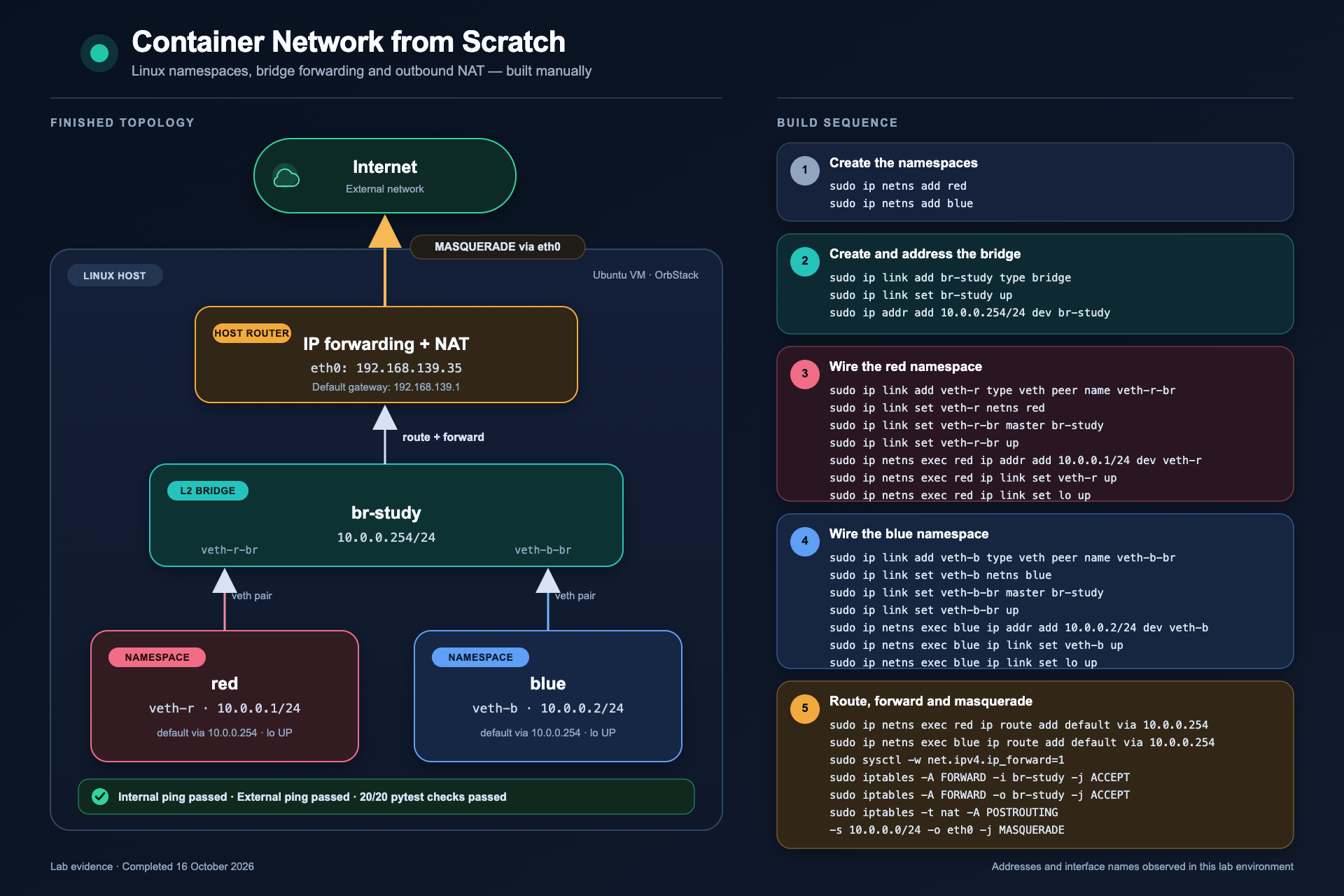
For the next exercise I created two network namespaces named red and blue. Each received one end of a veth pair. The host-side ends became ports on a Linux bridge named br-study.
sudo ip netns add red
sudo ip netns add blue

sudo ip link add veth-r type veth peer name veth-r-br
sudo ip link add veth-b type veth peer name veth-b-br

sudo ip link set veth-r netns red
sudo ip link set veth-b netns blue

sudo ip link set veth-r-br master br-study
sudo ip link set veth-b-br master br-study
I assigned 10.0.0.1/24 to the red side, 10.0.0.2/24 to blue and 10.0.0.254/24 to the bridge. Once the interfaces and bridge were up, the namespaces could reach each other.
One test failed in a useful way. A new namespace has its own loopback interface, and it starts down. Red could reach blue over the veth pair and bridge, but a ping to its own 127.0.0.1 failed. Bringing up lo inside each namespace fixed loopback without changing the bridge path.
Getting beyond the bridge
The bridge gave the namespaces local connectivity. Reaching an external address needed another layer.
I first checked the host's default route rather than assuming the outbound interface name:
ip route show defaultIn this VM the route used eth0. I then gave both namespaces a default route through the bridge:
sudo ip netns exec red ip route add default via 10.0.0.254
sudo ip netns exec blue ip route add default via 10.0.0.254
With host IP forwarding enabled, forwarding rules allowed traffic across br-study. A masquerade rule translated the namespace addresses as traffic left through eth0:
sudo iptables -A FORWARD -i br-study -j ACCEPT
sudo iptables -A FORWARD -o br-study -j ACCEPT

sudo iptables -t nat -A POSTROUTING \
  -s 10.0.0.0/24 \
  -o eth0 \
  -j MASQUERADE
The translation matters because the outside network has no route back to 10.0.0.0/24. Masquerading replaces the private source address with the host's outbound address, while connection tracking keeps enough state to send the reply back to the correct namespace.
And then red reached 8.8.8.8 and blue reached 1.1.1.1.
Breaking one boundary at a time
The fault tests made the design easier to understand than the successful build did.
When I set br-study down, the veth interfaces, namespace addresses and routes remained in place, but traffic between red and blue stopped. The shared Layer 2 component was the failed boundary. Bringing the bridge back up restored the path.
I then removed the masquerade rule. Local namespace traffic kept working because it stayed on the private bridge network. External traffic failed because packets left with source addresses the outside network could not route back to. Restoring the rule restored outbound connectivity.
Those two failures gave me a stronger troubleshooting order: check the link state, addressing, bridge membership and routes before moving on to forwarding, firewall rules and NAT. Testing one boundary at a time is much faster than changing several parts and hoping the next ping works.
Evidence, not a screenshot
I kept the answers, diagrams, observed interface mappings and fault investigations in an evidence folder alongside the lab material. I also ran the supplied automated tests:
uv run --project ../../.. --group test pytest tests/ -v20 passed in 0.47sThe tests checked Docker's bridge, both namespaces, bridge membership, addressing, routes, bidirectional connectivity, forwarding and masquerading. My full write-up is in the Docker networking evidence folder, and the original exercises are in the KubeCraft repository.
Kubernetes networking is more involved than this lab, but the packets still depend on Linux interfaces and routes, plus the filtering rules around them. I now have a firmer picture of that first hop out of a container, and a better way to troubleshoot when the path breaks.